The Snake project

On the agenda
- The challenge
- Your console
- The network
- Your organisation
What you are going to do
In pairs, for about 24 h
- design and code a Snake on the console soldered in Lab 4
- invent a second player, in a browser, who does not play the same game
- document it all in your repo, and demonstrate it
Everything from the labs is useful: the board, the game loop, the state machine, the display, the joystick.
The challenge
One Snake, two players, two games
One console, one browser
flowchart LR
  J1["Player 1: joystick"] --> C["XIAO console: rules and display"]
  C <-->|"Wi-Fi + WebSocket"| N["Player 2: browser"]
Player 1 plays Snake on the console. Player 2 joins the game from their phone, on a page served by the console itself.
The two do not play the same game: it is asymmetric multiplayer.
Player 1: a real Snake
- The snake moves cell by cell, at its own pace
- Four directions with the joystick, never a U-turn
- It eats, it grows, the score goes up
- A wall or its own body: the game stops
- Welcome, game, end: a state machine
- No flicker, no
delay()
Player 2: a role to invent
- The game master places food and obstacles
- The saboteur speeds up the snake, reverses its controls
- The ally guides towards bonuses, saves once
- The gambler bets on the snake’s downfall
Ideas, not a list: take one, combine them, or invent your own.
A single rule: their actions must really change the game.
Activity: invent a role
Imagine your player 2’s role
- What do they see in their page?
- What can they do, and how often?
- How do they win? How do they lose?
- Play a game by hand: one plays the snake, the other player 2
A good asymmetric role
1
Can each player win? A role that is too powerful kills the other’s game.
2
Do both always have something to do? A player who waits drops out.
Two “yes” answers, and your idea holds up. Keep track of your trials: they justify your choice.
Your console
Ready since Lab 4
What you already have
The hardware
- A board designed by you, then soldered and tested
- Joystick, two buttons, display, XIAO
- The lab pinout, which no longer changes
The software
- A 16 ms game loop, without
delay() justPressed()and the calibrated joystick- A display that does not flicker
- A state machine
The Snake starts from all of this. Only the game mechanics and the network are new.
Pong on the console Soldering and testing the board
The network
Bringing a browser into the game
The console creates its own Wi-Fi
flowchart LR
  T["Phone: 192.168.4.2"] <-->|Wi-Fi| C["Console: 192.168.4.1"]
As an access point, the console creates its own network: no need for the school Wi-Fi, nor the Internet. The phone connects to it and opens http://192.168.4.1/.
Give your network a unique name in the room.
Two servers, two roles
HTTP, port 80
Sends player 2’s page, once, when it is opened.
The browser asks, the console answers, the connection closes.
WebSocket, port 81
Exchanges the game messages, throughout the game.
The line stays open: each side talks whenever it wants.
Wi-Fi, HTTP and WebSocket ESP32, Wi-Fi and WebSocket
The network architecture
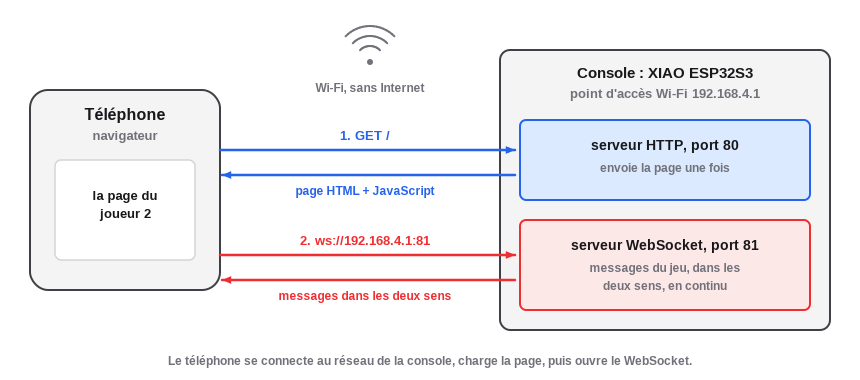
The page once, then the messages continuously.
Your protocol
| Direction | Message | Meaning |
|---|---|---|
| Console → browser | STATE:PLAYING |
The game phase changes |
| Console → browser | SCORE:12 |
New score |
| Browser → console | FOOD:12,7 |
Request: an apple at (12, 7) |
- Written before the code, in your repo
- The console is the referee: the browser proposes, the console decides
- An invalid message is ignored, never a crash
An exchange, in order
sequenceDiagram
  participant N as Browser
  participant C as Console
  N->>C: GET / (HTTP)
  C-->>N: the page
  N->>C: opening the WebSocket
  C->>N: STATE:PLAYING
  N->>C: a request from player 2
  Note over C: the console validates, then applies
  C->>N: the new state
The messages are up to you: only the sequence is imposed.
Disconnection is part of the game
stateDiagram-v2
  [*] --> Waiting
  Waiting --> Playing : browser connected
  Playing --> Paused : browser lost
  Paused --> Playing : browser back
  Playing --> End : snake dead
  End --> Waiting : START
A phone going to sleep is an event of the state machine, not a surprise.
Your organisation
Eight sessions, five milestones
The sessions
| Session | Goal |
|---|---|
| P1 | Kick-off, repo, Snake and player 2 on paper |
| P2 | Single-player Snake: grid, movement |
| P3 | Single-player Snake: growth, collisions |
| P4 | The network and the protocol |
| P5 | Player 2: their page, their role |
| P6 | Player 2 integrated into the game |
| P7 | Robustness and tests |
| P8 | Finishing and demonstration |
No more step-by-step
For the Snake, no tutorial guides you line by line. That is the heart of the project: search, try, compare, choose.
- How do you store a body that grows?
- How do you move at its own pace in a 16 ms game loop?
- What do you redraw when the snake moves by one cell?
Code found elsewhere (online, AI assistant)? Allowed, if it is understood and cited in your logbook.
The deliverables
| In the repo | Content |
|---|---|
| The board | Taken from Labs 3 and 4: schematic, routing, tests |
| The firmware | Code in modules, state machine, protocol |
| The tests | Each requirement checked, with its result |
| The logbook | One entry per session, with your sources |
| The presentation | A short video or a poster |
And a live demonstration: a complete game, including a browser disconnection.
Project brief Project Methodology
Assessment
30 %
the labs, board included, already validated in session
70 %
the project: game, player 2, code, repo and demo
A mark shared by the pair: each of you must be able to explain the whole project, including what you did not code.
Key takeaways
- The project starts on your soldered console, with the Pong as a base
- Player 2 plays another game, from a browser
- Console as access point, WebSocket, protocol written first
- The console is the referee, disconnection is planned for
- No step-by-step: you design, you justify, you document
For the rest of the session
- Create your repo from the template, and share it with your partner
- Read the whole brief, and write down your questions
- Write your player 2 idea in the logbook
- On paper: the Snake’s grid, snake body and state machine
Goal for the next session: a snake moving on the console.
Creating your repo from the template Project brief