Wi-Fi and ADC2
When Wi-Fi is active, the ESP32’s ADC2 becomes unusable. This is why the workshop joystick is wired to ADC1 pins (see the concept ADC & PWM).
Wi-Fi, HTTP and WebSocket
Understand how an ESP32 creates a Wi-Fi network, serves a web page and exchanges messages in real time with a browser using WebSockets.
Prerequisites:
Until now, the console only talked to its own peripherals: buttons, joystick, display. Communication buses connect components that sit a few centimetres apart. For a second player to interact from their phone, the scale has to change: go through Wi-Fi, and speak the language of browsers.
By the end of this concept, you will be able to:
The ESP32-S3 has a built-in 2.4 GHz Wi-Fi radio. It works in two modes:
| Mode | Role of the ESP32 | Example | Advantage | Limit |
|---|---|---|---|---|
| Station (STA) | Joins an existing network, like a phone | The home router | Internet access | Depends on the network (password, captive portal, blocked ports) |
| Access point (AP) | Creates its own network | A phone hotspot | Works anywhere, with no infrastructure | No Internet, about ten devices at most |
For a game console that must work in the classroom as well as in a demo, the access point is the safest choice: the console creates the Snake-Team3 network, the player’s phone connects to it, and nothing depends on the school network (often blocked for this kind of use).
flowchart LR
  subgraph AP["Wi-Fi network created by the console"]
    C["XIAO console\n192.168.4.1"]
    T["Phone\n192.168.4.2"]
    P["PC\n192.168.4.3"]
  end
  T <-->|Wi-Fi| C
  P <-->|Wi-Fi| C
On a network, every device has an IP address (four numbers, for example 192.168.4.1). In access point mode, the ESP32 always takes the address 192.168.4.1 and hands out the following ones to the devices that join it.
A single device can run several services: each one listens on a port (a number from 0 to 65535). By convention, a web server listens on port 80. The full address of a service is therefore written 192.168.4.1:80, and the browser adds the :80 by itself.
The classic analogy: the IP address is the address of a building, the port is the flat number.
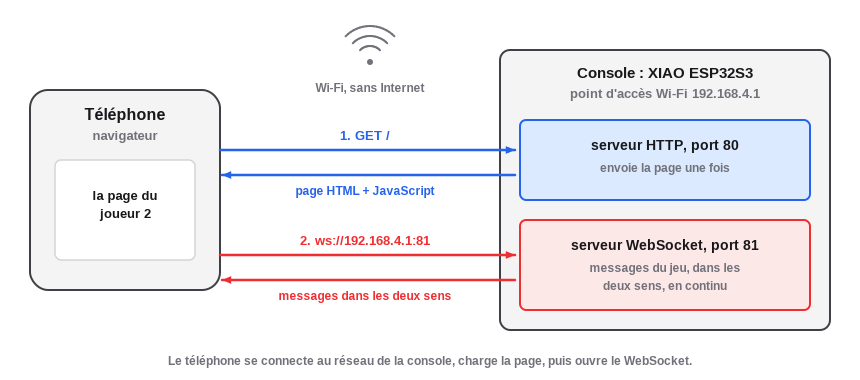
When you type http://192.168.4.1/ into a browser, it sends an HTTP request to the console, which sends back a response: the code of the web page (HTML, CSS, JavaScript). The page is displayed, and the connection ends.
sequenceDiagram
  participant N as Browser
  participant C as Console (web server)
  N->>C: GET / (request)
  C-->>N: 200 OK + HTML page (response)
  Note over N,C: the connection is closed
HTTP always works in this direction: the browser asks, the server answers. The server can never take the initiative.
In a game, the console must tell the browser as soon as something happens: the snake has eaten, the game is lost. With HTTP alone, the browser would have to ask “anything new?” several times a second (this is called polling): each request opens a connection, sends headers of several hundred bytes, and the answer arrives at best on the next round of questions. It is slow and costly, and the console mostly answers “nothing new”.
A WebSocket starts like an HTTP request, then the connection stays open. After that, either side can send a message at any time, without waiting to be asked: it is a bidirectional, real-time channel, like a serial link, but over Wi-Fi.
sequenceDiagram
  participant N as Browser
  participant C as Console
  N->>C: WebSocket opening (port 81)
  C-->>N: Connection accepted
  C->>N: SCORE:3
  N->>C: FOOD:12,7
  C->>N: STATE:GAMEOVER
  Note over N,C: the connection stays open until one side closes it
In the workshop, the console runs two servers:
| Server | Port | Role |
|---|---|---|
| Web server (HTTP) | 80 | Sends the player’s page, once, when it is opened |
| WebSocket server | 81 | Exchanges the game messages throughout the game |
The JavaScript of the page opens the WebSocket as soon as it is loaded: new WebSocket("ws://192.168.4.1:81/").
A WebSocket carries messages, but says nothing about their content: it is up to you to define a protocol, that is, the possible messages, their format and their meaning. It is the same approach as for UART (8N1 format), one level up.
The simplest option is a short text format, TYPE:values:
sequenceDiagram
  participant N as Browser
  participant C as Console
  N->>C: GET / (HTTP, port 80)
  C-->>N: the HTML page + JavaScript
  N->>C: WebSocket opening (port 81)
  C->>N: STATE:PLAYING
  C->>N: SCORE:12
  N->>C: FOOD:12,7
  Note over C: the console checks the request, then applies it
  C->>N: SCORE:13
| Direction | Message | Meaning of the message |
|---|---|---|
| Console → browser | STATE:PLAYING |
The game phase has changed |
| Console → browser | SCORE:12 |
New score |
| Browser → console | FOOD:12,7 |
The web player asks for an apple in cell (12, 7) |
A few rules avoid most problems:
The web server and the WebSocket server need to be given control regularly to process what comes in. Their service functions are therefore called on every pass of loop(), outside the frame rate:
void loop() {
    server.handleClient();   // HTTP: serves the page if someone requests it
    webSocket.loop();        // WebSocket: receives messages, manages connections

    // ... then the usual game loop, paced by millis()
}
flowchart LR
  A["server.handleClient()<br/>webSocket.loop()"] --> T{"16 ms<br/>elapsed?"}
  T -->|"no"| A
  T -->|"yes"| R["1. read: joystick<br/>and received messages"]
  R --> C["2. compute: the console<br/>validates and applies"]
  C --> D["3. draw, and send<br/>the state if it changed"]
  D --> A
The rule seen in From hardware to software has never been more true: no delay(). During a blocking wait, messages pile up, the browser thinks the console is frozen, and the connection ends up dropping.
Received messages arrive through a callback: a function you write, which the library calls on every event (connection, disconnection, message). As with an interrupt, do the minimum in it: store the command received, which the game loop will process on its next pass.
A player can close their browser, walk out of Wi-Fi range or have their phone go to sleep. The game must plan for it instead of suffering it, and that is a job for the state machine:
stateDiagram-v2
  [*] --> WaitingForPlayer
  WaitingForPlayer --> Playing : browser connected + START
  Playing --> Paused : browser disconnected
  Paused --> Playing : browser reconnected
  Paused --> WaitingForPlayer : timeout elapsed
  Playing --> GameOver : snake dead
  GameOver --> WaitingForPlayer : START
The “browser disconnected” event is a transition like any other. What it triggers (pause, game continued against the computer, end of game) is a design choice, to be decided and documented.
1. Why create an access point rather than join the school Wi-Fi?
2. Why is HTTP alone poorly suited to a real-time game?
3. The browser sends FOOD:40,2 while the grid is 24 × 30 cells. What should the console do?
192.168.4.1): ideal for a standalone console.loop(), without delay(), and disconnection is a transition of the FSM.