MakerSpace Amiens · Microcontrollers
Discovering the microcontroller
Lecture 1: from the chip to the code
Alban Petit
On the agenda
The course
A computer on a chip
Under the hood
From the code to the chip
1 h 30 lecture, no hands-on work. Common thread of the whole course: the game console (Pong in the labs, multiplayer Snake in the project).
Part 1 (about 10 min): where to find the documentation, the course schedule, what they will learn and what it will be useful for.
Parts 2 and 3: the vocabulary and the chip. Part 4: the development toolchain and time in loop(), more concrete, to keep for the second half when attention drops.
Part 4 opens with compiled / interpreted (about 5 min): start from Python, which they know, without going into syntax.
2
What you will be able to do
By the end of this lecture, you will be able to:
understand what a microcontroller is, and what sets it apart from a PC
name the blocks of a chip: CPU, Flash, RAM, peripherals, bus
explain what a register is, and what an interrupt is for
say what distinguishes a compiled language (C/C++) from an interpreted language (Python)
follow the path from the source code to execution on the chip
say why delay() is a problem in a loop()
Common thread of the course: a Pong , then a multiplayer Snake .
The Microcontrollers course
3
The course
Where to find help, what lies ahead, and why
Everything is on the website
doc.makerspace-amiens.fr , Workshops section, then Microcontrollers .
The syllabus and the assessment
The slides of each lecture, including these
The concepts : the theory, to reread before each lab
The tutorials : each lab, step by step
The guides : when something does not work
Each slide ends with a badge that opens the matching page. ↓ for the course page.
The Microcontrollers course
5
The course page
5.1
Finding the right page
You want to…
Go and see
Understand a notion
A concept (GPIO, bus, state machine…)
Do it, step by step
The lab’s tutorial
Get unstuck
A guide (board not found, black screen)
A component’s characteristic
Its reference sheet (XIAO, display)
The full details of a chip
Its datasheet , on the manufacturer’s website
The site’s search bar finds a page by keyword. The Need help? button, at the bottom right, opens the MakerSpace’s AI assistant.
Course syllabus Recovering an ESP32-S3 board
6
Outside the site: the official sources
Espressif : the ESP32-S3 datasheet, the Arduino-ESP32 documentationSeeed Studio : the XIAO ESP32S3 board wikiLibraries : their GitHub page, its README and its examplesPlatformIO : its documentation, for the project configuration
A forum or an AI assistant helps you search. But when two sources contradict each other, the manufacturer’s documentation settles it.
XIAO ESP32S3
7
The course schedule
Session
Duration
What you do
Lectures 1, 2, 3
3 × 1 h 30
The concepts, in lectures
Lab 1
1 h 30
Install, flash a first program
Lab 2
3 h
Test the modules of the kit
Lab 3
3 h
Design your board in KiCad
Lab 4
3 h
Solder the board, run a Pong on it
Project
24 h
A multiplayer Snake, in pairs
The three lectures first, then the labs, then the project. Each stage builds on the previous one.
Course syllabus
8
How you are assessed
30 %
The labs : each checkpoint validated in session, including the two validations of your board
70 %
The project : the game, the browser player, the code, the repo and the demonstration
A checkpoint is validated in session , on your setup: come with work that works.
Course assessment
9
What you are going to cover
Electronics
Read and test a component
Wire on a breadboard
Design a board, solder it
Embedded software
Program in C/C++
Never block the program
Structure with a state machine
Networking
Wi-Fi, web page, WebSocket
Design a protocol
Method
Test, validate, document
Run a project in pairs
Course syllabus
10
And in your life as an engineer?
Microcontrollers are everywhere : cars, medical, industry, energy
You will choose them, specify them, integrate them into your products
You will speak the same language as electronics engineers
You will be able to prototype a sensor, a test bench, a demonstrator on your own
Test, design, document: reflexes for any project
Even if you do not program microcontrollers every day, you will work with those who do.
The Microcontrollers course
11
Activity: what is it, for you?
What is a microcontroller, for you?
One answer per person, out loud: a word, a sentence, an example
No right or wrong answer
Let all the answers come, even wrong or vague ones (“a small processor”, “an Arduino”, “a chip in a washing machine”…): they will serve as a starting point. Rephrase out loud what relates to the nature (a computer, a chip), the examples (everyday objects) and the role (control, measure).
The following slides pick up these answers: quote the class’s answers along the way to complete or correct them.
12
A computer on a chip
Sense, decide, act
There are hundreds of them around you
Every phone contains several: touchscreen, battery, radio
Wireless earbuds , watches , access badges In every room: projector , smoke detector , thermostat
In the corridor: the printer , the vending machine , the badge readers
At home: the microwave , the washing machine , the remote control
And 50 to 150 in a recent car: windows, airbags, injection
None of them needs a “real” computer. They need a chip costing a few euros, which starts instantly and does its task in a loop.
What is a microcontroller?
14
Always the same loop
flowchart LR
  A["Sense<br/>(sensors)"] --> B["Decide<br/>(the program)"]
  B --> C["Act<br/>(actuators)"]
  C -.-> A
A thermostat senses the temperature, decides it is too cold, acts by turning on the heating. Then it starts again, forever.
You will find this loop exactly as is in your Pong: read the joystick, compute the ball’s position, redraw the screen.
What is a microcontroller? Sensors
15
The “decide” part is you.
void loop() {
  int temperature = readSensor();    // sense
  if (temperature < 19) {           // decide
    turnOnHeating();                 // act
  }
}
The microcontroller cannot do anything on its own. Without a program, it is an inert chip: the 19 °C threshold and what is done with it, nobody will write them for you.
16
The course vocabulary
Term
What it is
Examples from the project
Sensor Turns a physical quantity into an electrical signal
button, joystick, potentiometer
Actuator Turns an electrical signal into an action
LED, display, motor, buzzer
Pin A leg of the chip, connected to the outside world
D5, D0 (GPIO6, GPIO1)
Program The sequence of instructions you write
main.cpp
A button is a sensor, an LED is an actuator.
Sensors
17
The physical world does not wait
A microcontroller is judged on its punctuality , not its power.
An airbag must fire 20 ms after the impact, never 100
The Pong screen is redrawn every 16 ms, otherwise it stutters
A servo motor expects a pulse every 20 ms, within 10 µs
Meeting the deadline at every pass matters more than being fast once
Deterministic : the same inputs produce the same actions, in the same time, at every pass. On a PC a 200 ms delay goes unnoticed, here it breaks the system. Real time does not mean “fast”, it means “on time”.
The slide that prepares everything that follows: it is because the chip is connected to the physical world that it must be predictable, and this determinism explains why a PC operating system is not run on it (part 3) and the hunt for delay().
Useful counter-example: on a PC, an antivirus waking up steals 300 ms from the program. Nobody complains. A servo motor, however, shakes.
What is a microcontroller?
18
Why not a “real” computer?
Regular computer
Microcontroller
Tasks Thousands, at the same time
A single one, in a loop
Price Several hundred €
A few euros, sometimes cents
Power Plugs into the mains
Months on a battery
Start-up Several seconds
Instant
System A full OS
None, usually
This frugality is what makes it so widespread: you can put them everywhere, for next to nothing, without thinking about it.
What is a microcontroller?
19
What about the Raspberry Pi?
Microcontroller
A single task, real time, very little energy, instant start-up.
ESP32-S3, Arduino, STM32
Single-board computer
A real operating system (Linux), a screen, full networking, plenty of memory.
Raspberry Pi
The question to ask is not “which is the most powerful” but “what do I really need”. A Raspberry Pi that takes 20 seconds to boot cannot fire an airbag.
What is a microcontroller?
20
Who makes microcontrollers?
Manufacturer
Country
Families
Speciality
STMicroelectronics
France / Italy
STM32
Industry, huge range
NXP
Netherlands
LPC, i.MX RT
Automotive, contactless
Infineon
Germany
AURIX, PSoC
Automotive, power
Renesas
Japan
RA, RX
Automotive, Arduino Uno R4
Microchip
United States
PIC, AVR
The Arduino Uno’s ATmega
Espressif
China
ESP32
Built-in Wi-Fi, at low cost
The top five share most of the market, driven by the automotive industry. Others rule a niche: Nordic for Bluetooth, Raspberry Pi for education.
What is a microcontroller?
21
Espressif, Wi-Fi for everyone
2008 : founded in Shanghai2014 : the ESP8266 puts a programmable Wi-Fi chip on sale for a few euros2016 : the ESP32 adds a second core and BluetoothMakers adopt it: Arduino, open documentation, thousands of projects
So does industry: connected plugs, bulbs, sensors
Not the biggest manufacturer, but the reference for Wi-Fi connected devices.
What is a microcontroller?
22
The ESP32 family
Chip
Cores
Radio
What for
ESP32
2 × 240 MHz
Wi-Fi, Bluetooth
The original, versatile
ESP32-S2
1 × 240 MHz
Wi-Fi
Native USB
ESP32-S3 2 × 240 MHz Wi-Fi, BLE 5 The most powerful with Wi-Fi
ESP32-C3
1 × 160 MHz
Wi-Fi, BLE 5
Low price, RISC-V core
ESP32-C6
1 × 160 MHz
Wi-Fi 6, BLE, Thread
Smart home
ESP32-P4
2 × 400 MHz
None
Multimedia
S : performance, C : low-cost (RISC-V), P : high performance without radio. The ESP32-S3 is the top of the connected range .
What is a microcontroller?
23
Why the ESP32-S3?
Built-in Wi-Fi and Bluetooth : player 2 plays from a browserPower to spare : game, colour display and network at the same timeNative USB : programmed without a driver, on every systemAn accessible ecosystem : Arduino, PlatformIO, ESP-IDFLess than €10 per board , and the same chip in real products
In return: it consumes more than a low-power chip, and it lives at 3.3 V .
What is a microcontroller?
24
Chip, module or development board?
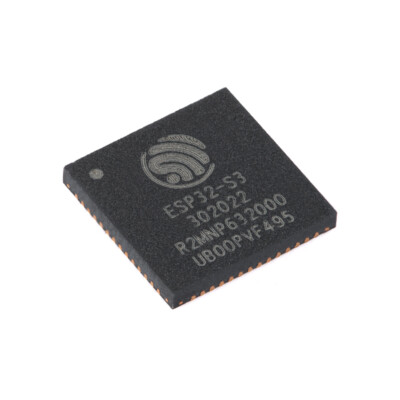
The chip
The µC alone, 7 × 7 mm
Unusable on its own
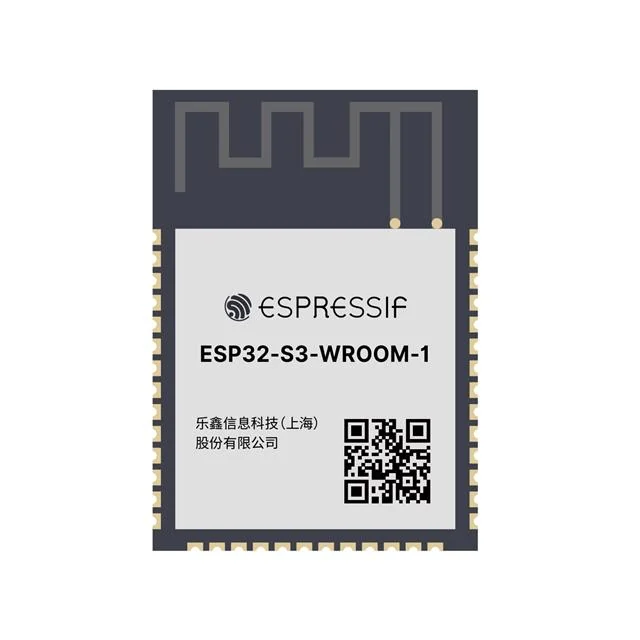
The module
Chip, Flash, crystal
Antenna, shielding
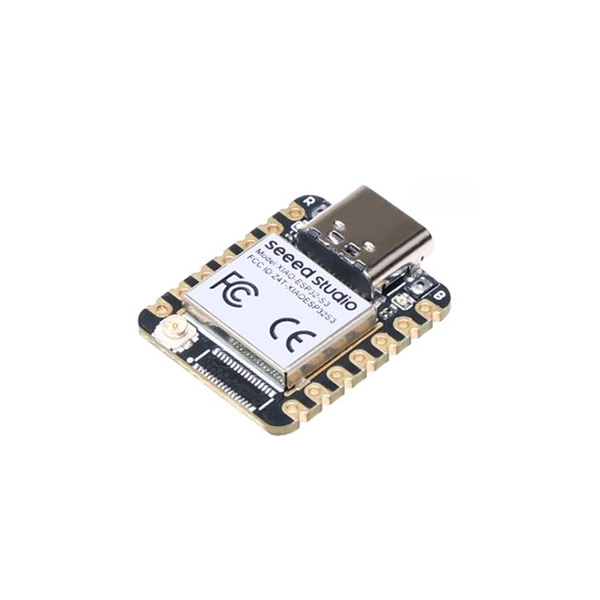
The dev board
USB, regulator
Buttons, pins
You program the chip . The dev board (XIAO) adds what is needed to connect it to the PC. ↓ to see what it contains.
XIAO ESP32S3
25
What is on the XIAO
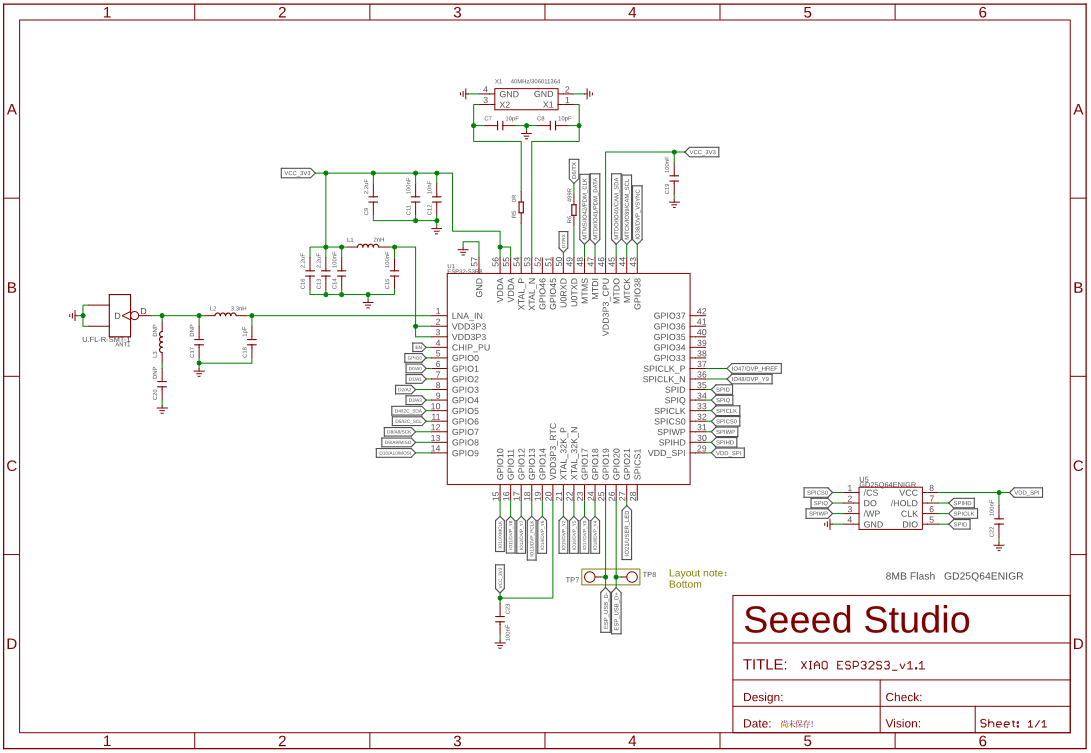
The ESP32-S3 chip in the middle, its 40 MHz crystal, its 8 MB Flash, the antenna and the decoupling capacitors. Schematic: Seeed Studio.
XIAO ESP32S3
25.1
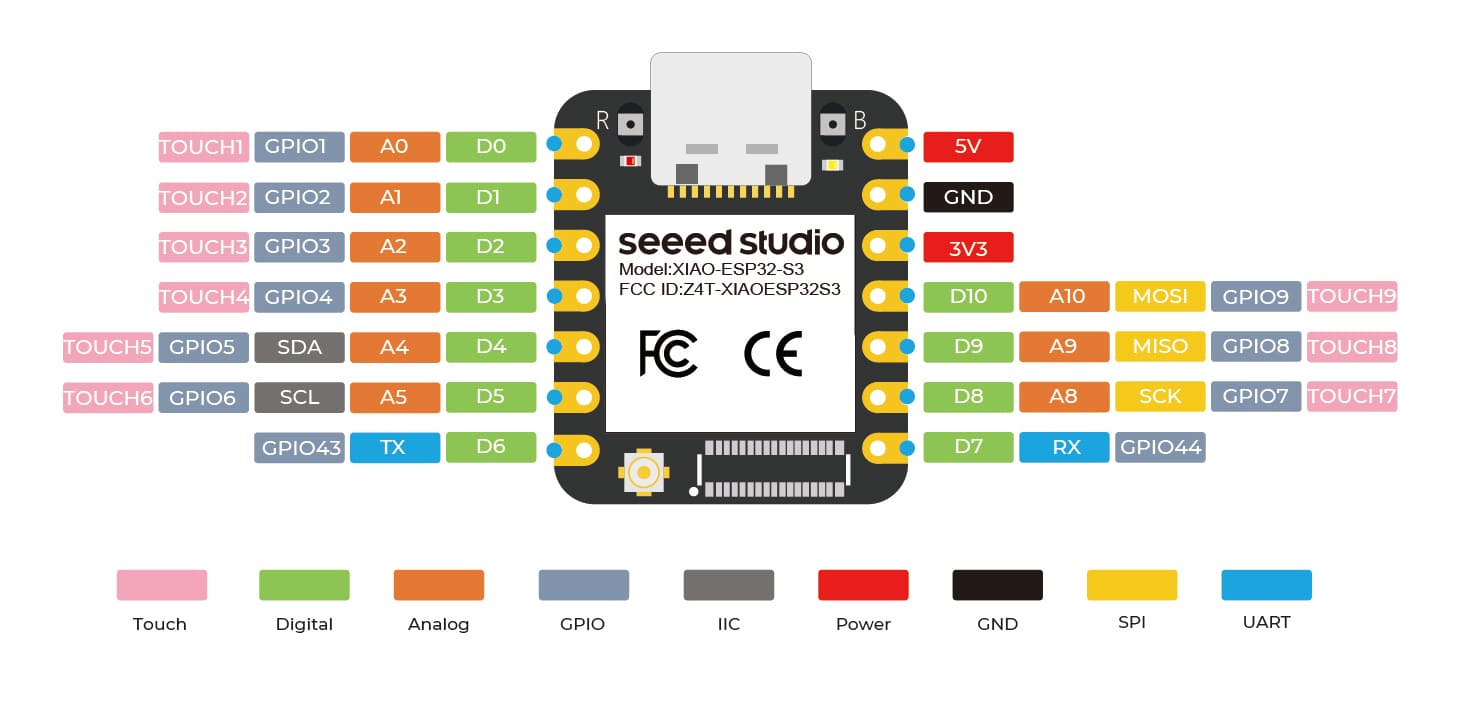
The XIAO pinout
11 pins, D0 to D10, each with several possible functions. Image: Seeed Studio.
XIAO ESP32S3
25.2
Connecting a GPIO pin directly to 5 V (an Arduino Uno, a sensor powered at 5 V) can destroy the chip irreversibly. It is the most frequent and most expensive mistake in the course: before connecting a module, look up its supply voltage.
GPIO and the digital world
26
Under the hood
CPU, memories, peripherals, bus
Five building blocks, a single chip
Block
Role
Software access
CPU Executes the instructions one by one
direct
Flash Stores the program (persistent)
read at run time
RAM Variables, call stack (volatile)
fast read/write
Peripherals GPIO, ADC, UART, SPI, PWM
through registers
Bus Connects everyone
transparent with Arduino
Everything is on the same silicon: a System on Chip . Powering it is all it takes.
Architecture of a microcontroller
29
The CPU can only do one thing
Fetch : get the next instruction from Flash, at the address given by the program counter.
30
The CPU can only do one thing
Decode : understand what the instruction asks for, and on which data.
31
The CPU can only do one thing
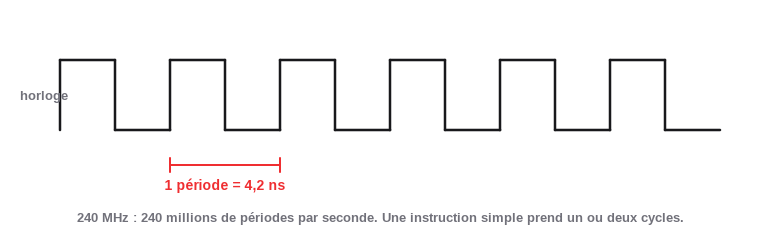
Execute : compute in the ALU , or transfer a piece of data. Then start again, 240 million times per second .
Deep down, a CPU only does two things: compute, and move bytes from one place to another.
Architecture of a microcontroller
32
240 MHz, what does that mean?
Operation
Order of magnitude
An integer multiplication
one or two cycles
A digitalWrite()
a few dozen cycles
Redrawing the 240 × 320 screen over SPI
a few million cycles
Establishing a Wi-Fi connection
several hundred million
At 60 frames per second, each frame has 4 million cycles .
Architecture of a microcontroller
33
Two cores, and the right to sleep
The ESP32-S3 has two Xtensa LX7 cores : with Arduino, setup()/loop() run on core 1, Wi-Fi occupies core 0 in the background, under the control of a small kernel (FreeRTOS)
Cutting the clock of an unused peripheral saves energy
Sleep modes (light sleep , deep sleep ) switch off all or part of the chipThe RTC keeps running in deep sleep to wake the board up at the set time
This is what lets a battery-powered sensor last for months: it sleeps 99.9 % of the time.
Architecture of a microcontroller
34
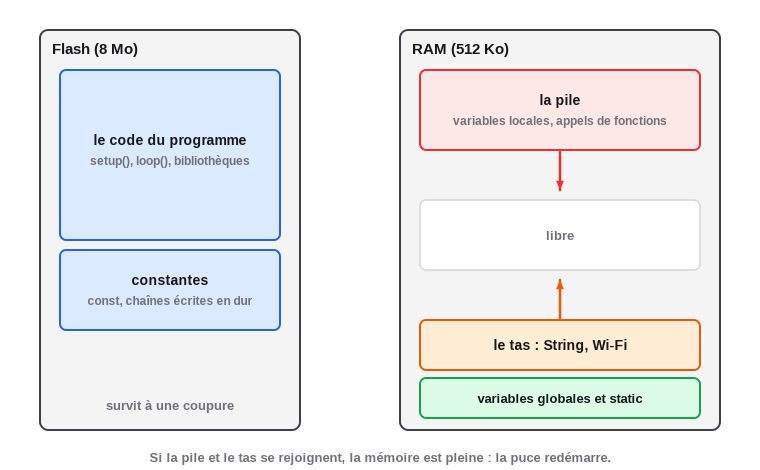
Two memories, two uses
Flash
RAM (SRAM)
Content Compiled program, constants
Variables, stack, heap
Persistence Survives a reset
Lost at power-off
Speed Slower
Very fast
Size 8 MB
512 KB (+ 8 MB PSRAM)
Two separate address spaces: a modified Harvard architecture. ↓ to locate them on the block diagram.
Architecture of a microcontroller
35
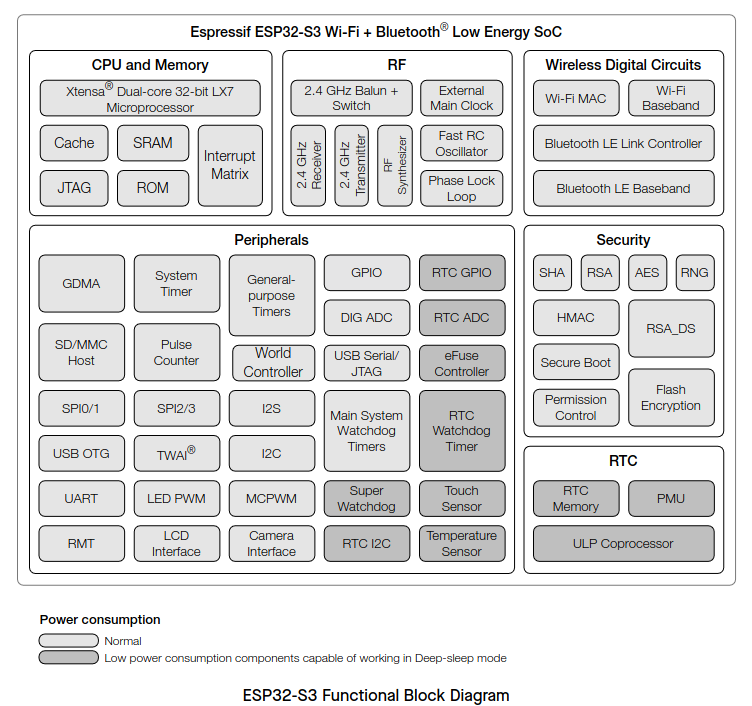
The memories on the block diagram
Find the ROM (the boot program burned in at the factory), the internal SRAM , and the link to the Flash and the PSRAM , outside the chip.
Architecture of a microcontroller
35.1
The peripherals glossary
Acronym
Full name
Role
GPIO General Purpose Input/Output
Digital input or output
ADC Analog to Digital Converter
Voltage to number
UART / I2C / SPI
Serial buses
Timer Hardware counter
Periodic events, PWM
DMA Direct Memory Access
Transfer without the CPU
RTC Real-Time Clock
Clock, even in sleep
Watchdog Watchdog timer
Restarts if stuck
Each acronym will get its own slide in Lecture 2 or Lecture 3.
Architecture of a microcontroller
36
Unlike the original ESP32, the ESP32-S3 has no hardware digital-to-analog converter. To produce a variable voltage, you will have to use PWM, which we will see in Lecture 2.
ADC and PWM
37
The bus: a shared highway
flowchart TB
  CPU["CPU (drives the bus)"]
  BUS["Shared bus: addresses · data · control"]
  RAM["RAM"]
  PA["Periph. A<br/>(active transmitter)"]
  PB["Periph. B<br/>(high impedance)"]
  CPU --- BUS
  BUS --- RAM
  BUS --- PA
  BUS --- PB
Three bundles: the address says who we are talking to, the data travels, the control specifies “I am reading” or “I am writing”.
Architecture of a microcontroller
38
Only one component talks at a time
If two peripherals pushed a value onto the data bus at the same time, one forcing a 0 and the other a 1, it would be a short circuit .
Hence three-state outputs: on top of 0 and 1, a high impedance state that electrically disconnects the component from the line.
At any moment, only one transmitter is active; all the others are listening. The address designates the one allowed to answer.
Remember the term high impedance : it will come back in Lecture 2 with floating inputs, and in Lecture 3 with I2C.
Architecture of a microcontroller
39
Registers: the hardware / software interface
Each peripheral is driven through registers : simple memory cells at a fixed address.
Writing to a register turns on an LED
Reading a register gives the state of a button
digitalWrite(LED, HIGH) writes to the right register
Storing a variable and turning on an LED: the same operation, putting a value at an address.
Architecture of a microcontroller
40
A register is 32 switches
A 32-bit register often drives 32 things at once: one bit per pin, one bit per option. You only touch the targeted bit, with C’s bitwise operators:
reg |= ( 1 << n ); // sets bit n to 1, without touching the others
reg &= ~ ( 1 << n ); // sets bit n to 0
reg ^= ( 1 << n ); // toggles bit n
if ( reg & ( 1 << n )) // tests bit n
This is the language of datasheets: the reference manual describes each register bit by bit.
Architecture of a microcontroller
41
Breaking down reg |= (1 << n)
The instruction combines three operations:
The shift 1 << n : the value 1 (00000001) shifted n positions to the left. For n = 3: 00001000. It is a mask : only the targeted bit is 1.The bitwise OR | : 1 OR x gives 1, so the targeted bit becomes 1; 0 OR x gives x, so the others do not change.The assignment |= : the shorthand for reg = reg | (1 << n);.
Architecture of a microcontroller
42
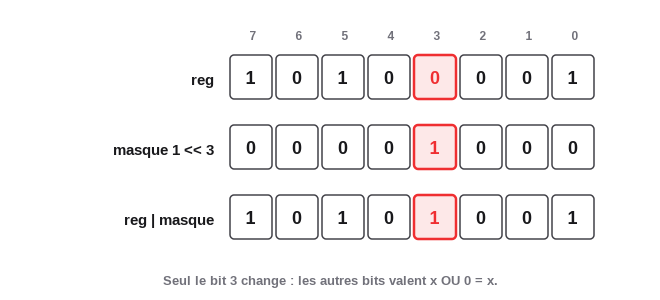
An example, bit by bit
We want to set bit 3 to 1, without touching the others:
reg            1010 0001
1 << 3         0000 1000   the mask
reg | mask     1010 1001   only bit 3 has changed
Bits are numbered from right to left , starting from 0. The same idea works for the other lines: & ~mask sets the bit to 0, ^ mask toggles it, & mask tests it.
Architecture of a microcontroller
43
Under digitalWrite(), a write
digitalWrite ( 21 , HIGH ); // the Arduino version
REG_WRITE ( GPIO_OUT_W1TS_REG , 1 << 21 ); // the register, directly
REG_WRITE ( GPIO_OUT_W1TC_REG , 1 << 21 ); // sets the pin back to 0
GPIO_OUT_W1TS_REG is just a name for the address 0x60004008. W1TS : write 1 to set , only the bits written as 1 become 1, the others do not move.
Why not GPIO_OUT_REG |= ...? It has to read, modify, rewrite: if an interrupt changes the register in the meantime, its change is lost. W1TS does it in a single write .
Architecture of a microcontroller ESP32-S3 Technical Reference Manual
Nobody will write a register by hand in the course: the goal is to show that there is no magic under digitalWrite(). It is also what makes Arduino code portable: the function is the same, only the address and the bit change from one chip to another.
44
Activity: Flash or RAM?
In your Pong, where does each of these live?
The code of loop()
The game score
A sprite’s image, declared const
The ball’s position
The Wi-Fi network name, hard-coded
A local counter, in a function
Bonus question to break ties: which ones survive a press on RESET? Answer on the next slide: everything in Flash (the code, the constants, the hard-coded text), nothing in RAM. The score goes back to zero.
45
Where your variables live
What you write
Where it lives
For how long
The code, hard-coded strings
Flash
survives a reset
const uint16_t SPRITE[] = {...};Flash
survives a reset
int score; outside the functionsRAM
the whole program
int i; in a functionRAM, on the stack
the duration of the call
The const keyword moves a large array from RAM to Flash: precious for a game’s images.
Architecture of a microcontroller
46
The stack and the heap
The stack
Local variables, parameters
Taken at the call, given back on return
Fast, automatic, but small
The heap
Memory reserved on demand
Used by String, Wi-Fi
Fragments over time
A large array declared in a function can overflow the stack : the chip restarts. In a game, prefer fixed-size global variables.
The stack is a stack of plates: each function call puts down a plate (its local variables), the return removes it. Everything is automatic, but the stack is small (a few KB for the loop() task).
The heap is a car park: you take a space when you need one, you give it back when you leave. With all the arrivals and departures, scattered free spaces remain, too small for a big car: that is fragmentation. Arduino’s String and the Wi-Fi stack use it behind the scenes.
Architecture of a microcontroller
47
From the code to the chip
Compile, flash, execute
In which language?
On a microcontroller, you program in C or C++
Arduino is C++ You know Python: the logic is the same
What changes is when the code is translated into instructions for the processor.
From hardware to software
49
Arduino: three things under one name
Boards
Uno, Nano, Mega: development boards, often built around an ATmega
Software
The Arduino IDE, to write, compile and upload
A framework
setup(), loop(), digitalWrite()… ported to hundreds of chips, including the ESP32-S3
In the course, we use the framework (Arduino-ESP32), with PlatformIO. Neither the board nor the IDE.
From hardware to software
50
Why not an Arduino Uno board?
Arduino Uno
XIAO ESP32S3
Processor ATmega328P, 8-bit, 16 MHz
ESP32-S3, 2 32-bit cores, 240 MHz
RAM 2 KB
512 KB + 8 MB
Wi-Fi, Bluetooth No
Yes
Logic voltage 5 V
3.3 V
Size 69 × 53 mm
21 × 18 mm
The Arduino framework brings simplicity ; the ESP32-S3, the power and Wi-Fi needed for a colour display and the browser player.
What is a microcontroller?
51
Compiled or interpreted
C / C++: compiled
The compiler translates the whole program beforehand , on your PC, into machine code .
The chip executes it directly.
Python: interpreted
An interpreter translates the code during execution, as it goes.
It must run on the machine that executes it.
From hardware to software
52
Why C/C++ on a microcontroller?
No interpreter to fit in the chip’s small memoryFast : the chip executes the machine code directlyErrors caught early : the compiler reports them before flashing
From hardware to software
53
The full journey
flowchart LR
  A["Source code<br/>(.cpp)"] --> B["Compiler<br/>(gcc-xtensa)"]
  B --> C["Binary<br/>(.bin)"]
  C --> D["Flashing<br/>(USB / UART)"]
  D --> E["Execution<br/>ESP32-S3"]
A click on Upload triggers the four steps, always in this order. When something fails, the first question is: at which step?
From hardware to software
54
Element
Role
Compiler (gcc for Xtensa)Translates C++ into machine instructions
Arduino core Provides pinMode(), digitalWrite(), analogRead()
Uploader (esptool)Transfers the binary to the Flash, over USB
The IDE only orchestrates these three tools. Arduino IDE or PlatformIO, the chain stays the same: compile, flash, execute .
PlatformIO Arduino IDE
55
“Compiling” covers three steps
Preprocessor : handles the #include and #define directives, pastes in the content of the librariesCompilation : each C++ file becomes object code, separatelyLinking : all the objects are assembled into a binary, resolving the references
Telling them apart means knowing how to read an error. It is the most profitable skill of the semester.
From hardware to software
56
Reading an error
Message
Step
Likely cause
expected ';' before ...compilation
a syntax mistake, often one line before
'x' was not declaredcompilation
misspelled variable, or missing #include
undefined reference to ...linking
library missing from lib_deps
A fatal error occurred: Failed to connectflashing
wrong port, charge-only cable, BOOT button
Fix the first error, not the next 40.
From hardware to software
57
Reading a successful build
RAM:   [=         ]   6.0% (used 19736 bytes from 327680 bytes)
Flash: [=         ]   8.1% (used 270213 bytes from 3342336 bytes)
========== [SUCCESS] Took 4.21 seconds ==========
A simple Blink already weighs 270 KB : the Arduino core, FreeRTOS and the USB drivers are compiled along with your ten lines.
RAM : the global variables (neither the stack nor the heap)Flash : the code and the constants, what flashing writes
Indicative values on the XIAO ESP32S3. Keep an eye on these two lines when you add images.
From hardware to software
58
In this order: check that the USB-C cable carries data (many cables only charge), that the right port is selected, then force upload mode: unplug the XIAO, hold BOOT while plugging the cable back in, release and start the upload again. Then press RESET to start the program.
Checking the toolchain
59
A whole program in two functions
void setup () { // only once, at start-up
pinMode ( LED_PIN , OUTPUT );
Serial . begin ( 115200 );
}
void loop () { // in a loop, until power is cut
digitalWrite ( LED_PIN , HIGH );
delay ( 500 );
digitalWrite ( LED_PIN , LOW );
delay ( 500 );
}
No main(): the Arduino core writes it, and calls setup() then loop(). With PlatformIO, main.cpp starts with #include <Arduino.h>: without it, none of these functions exist.
From hardware to software
60
No PC operating system
On a computer, your program is one process among hundreds. Here, it is the only program on the chip:
a small kernel (FreeRTOS) runs Wi-Fi and USB alongside, but all your code lives in a single task : loop()
a delay() pauses this task: nothing in your program moves forward, buttons included
no clean shutdown: cutting the power stops the program dead
In return, your code is sole master of its time: its behaviour is predictable .
From hardware to software
61
Activity: find the bug
void loop () {
digitalWrite ( LED , HIGH );
delay ( 500 );
digitalWrite ( LED , LOW );
delay ( 500 );
if ( digitalRead ( BUTTON ) == LOW ) {
fire ();
}
}
Expected answer: the button is only read once per second, and only at the exact moment the program reaches the line. A 200 ms press has a one in five chance of being seen. Move on to the next slide.
62
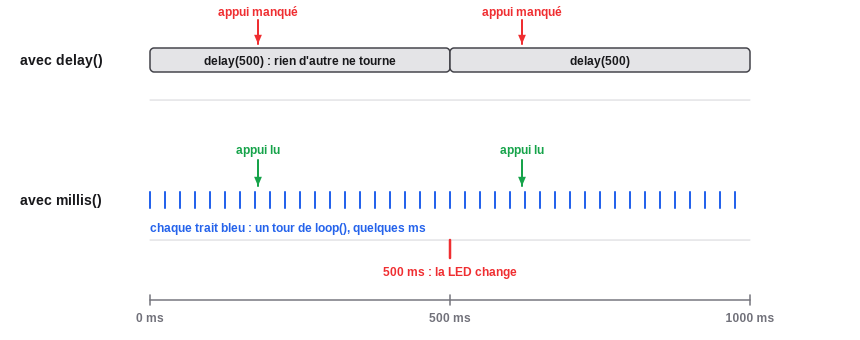
The program spends 1 second out of 1 in the delay() calls. The digitalRead() is only reached once per pass.
A short 200 ms press: seen one time in five
Add a screen to refresh: the game becomes unplayable
The solution is not to shorten the delay(), it is to never block
From hardware to software
63
Never block: check the time
unsigned long lastBlink = 0;
const unsigned long INTERVAL = 500;   // ms
int ledState = LOW;

void loop() {
  if (millis() - lastBlink >= INTERVAL) {
    lastBlink = millis();
    ledState = !ledState;
    digitalWrite(LED_PIN, ledState);
  }
}
The time is compared with a stored time: nothing is ever frozen.
From hardware to software
64
How big is an int?
Type
Arduino Uno (8-bit)
ESP32-S3 (32-bit)
int16 bits, up to 32,767
32 bits, up to 2.1 billion
long, unsigned long32 bits
32 bits
uint8_t8 bits, from 0 to 255
same
uint32_t32 bits
same
The size of an int depends on the chip: the same code can overflow on one and not on the other. The types from <stdint.h> (uint8_t, int16_t, uint32_t) have the same size everywhere: use them whenever the size matters.
From hardware to software
65
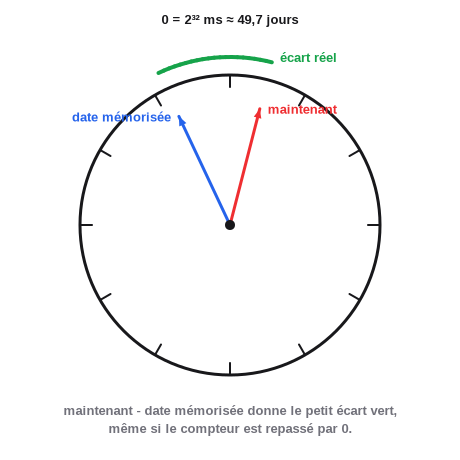
millis() goes round the dialmillis() returns a 32-bit unsigned integer: it wraps back to 0 after 2³² ms, i.e. 49.7 days .
if ( millis () - lastBlink >= INTERVAL ) // always correct
if ( millis () >= lastBlink + INTERVAL ) // wrong at the wrap-around
Subtracting two unsigned numbers gives the real gap even if the counter has gone round, like on a clock: from 11 pm to 1 am, 2 hours have passed.
Always write now - time >= duration.
From hardware to software
49 days is long for a Pong, but not for a sensor, a kiosk or a thermostat that is never switched off. The bug never shows up in testing, only in production: the best argument for picking up the right habit right away.
66
For a short, one-off pause (initialising a component, waiting at start-up), delay() is perfectly acceptable. It is in loop(), when several tasks must move forward in parallel, that it should be avoided.
From hardware to software
67
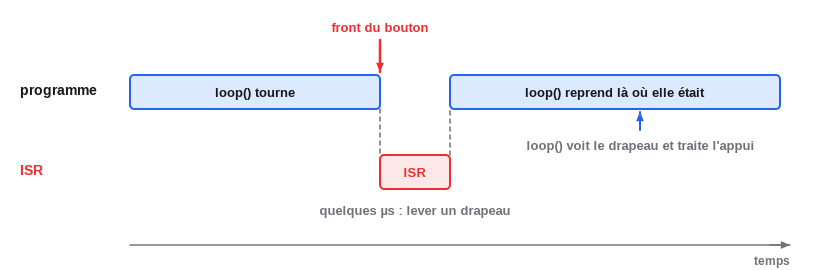
Or get notified: the interrupt
volatile bool pressDetected = false;

void IRAM_ATTR onPress() {
  pressDetected = true;   // as short as possible
}

void setup() {
  pinMode(BTN_PIN, INPUT_PULLUP);
  attachInterrupt(digitalPinToInterrupt(BTN_PIN), onPress, FALLING);
}
On an edge of the button, the hardware suspends loop(), runs this very short function, then resumes exactly where it left off. IRAM_ATTR places it in internal RAM: without it, the chip ends up crashing.
The mechanism first: registers are the software talking to the hardware; the interrupt is the hardware talking to the software. Then the syntax, now that setup() and loop() are known.
Insist: while this function runs, everything else is suspended, including other interrupts. Never a Serial.println(), never a delay(), never a library call inside it. It raises a flag, loop() does the work. Lecture 2 comes back to it with button bounce, and the role of volatile.
Architecture of a microcontroller GPIO and the digital world
68
Key takeaways
A µC = CPU + Flash + RAM + peripherals, on a single chip
Sense, decide, act: the “decide” part is your program
Flash = the program (persistent), RAM = the data (volatile)
Peripherals are driven through registers
Code → compilation → linking → flashing → execution
A single task, loop(): delay() freezes it, millis() blocks nothing
Logic voltage: 3.3 V
Architecture of a microcontroller From hardware to software
69
To do on your side
Install VSCode , then the PlatformIO extension
Let PlatformIO download the espressif32 platform: it is long, do not leave it until the last minute
Go through the toolchain check tutorial to know what lies ahead
A working development toolchain before the hands-on work saves a whole session.
Installing VSCode Installing PlatformIO Checking the toolchain
70