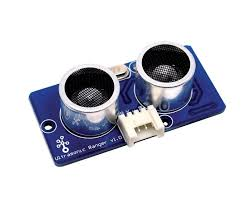
Perceiving the physical world
An automatic system, whether a production line, a car, a connected object or a game console, must know its environment in order to react: a temperature, a position, a distance, a press. That is the job of sensors.
By the end of this concept, you will be able to:
- define a sensor and its main characteristics;
- describe a measurement chain, from the physical phenomenon to the number processed by a program;
- tell apart the types of signals and the families of sensors (active, passive);
- read a sensor with a microcontroller, according to the type of signal it delivers.
What is a sensor?
A sensor turns a physical quantity (the input quantity, or measurand) into another quantity (the output quantity) that represents it and can be used to measure or to control. Most often, the output is electrical: a voltage, a current, a resistance, or directly a digital value.
flowchart LR
  E(["Input quantity\n(temperature, position...)"]) --> C(["Sensor"]) --> S(["Output quantity\n(voltage, resistance...)"])
  A(["Energy"]) -.-> C
A few sensors you have already come across:
- the joystick of a game controller: two potentiometers whose resistance depends on the position of the stick;
- the photoresistor of an automatic light: its resistance drops as the light increases;
- the accelerometer of a phone: it detects the orientation of the screen;
- the button: the simplest sensor of all, which only knows two states.
The output is not always electrical: a needle pressure gauge or a pneumatic sensor produce a displacement or a pressure. But to be read by a microcontroller, the information must end up in electrical form.
The characteristics of a sensor
The datasheet of a sensor gives its characteristics. The most important ones:
| Characteristic |
Definition |
Example |
| Measuring range |
The extreme values the sensor can measure |
-55 °C to 150 °C |
| Sensitivity |
The change in the output for a change in the input |
10 mV per °C for the LM35 temperature sensor |
| Resolution |
The smallest change in the input the sensor can distinguish |
0.1 °C |
| Accuracy |
The ability to give a measurement close to the true value |
± 0.5 °C |
| Response time |
The time the output takes to follow a change in the input |
1 s to reach the new value |
Sensitivity takes you from the output to the measured quantity. For the LM35, a voltage of 250 mV corresponds to:
$$
T = \frac{250\ \text{mV}}{10\ \text{mV/°C}} = 25\ \text{°C}
$$
A measurement is never exact: it always comes with an uncertainty. We write, for example, $T = 25 \pm 0.5$ °C. The notions of precision, accuracy and uncertainty, and the common measurement errors, are covered in the concept Precision, accuracy and good measuring practice.
The measurement chain
Between the physical phenomenon and the number a program displays or uses, the information goes through several stages:
flowchart LR
  subgraph Analog
    G(["Physical\nquantity"]) --> C(["Sensor"]) --> M(["Signal\nconditioning"])
  end
  M --> N(["Digitisation\n(ADC)"])
  subgraph Digital
    N --> T(["Processing"]) --> A(["Display,\ncontrol"])
  end
- The sensor converts the physical quantity into an electrical signal.
- Signal conditioning adapts this signal: amplifying a signal that is too weak, filtering out disturbances, converting a resistance into a voltage.
- Digitisation, by an analog-to-digital converter (ADC), measures the voltage at regular intervals and turns it into a number.
- Processing, by a microcontroller or a computer, makes use of these numbers: calculation, logging, display, decision.
More and more sensors integrate the first three stages in a single package: the DS18B20 temperature sensor or the BME280 temperature, humidity and pressure sensor deliver a digital value directly, which the microcontroller reads over a communication bus: 1-Wire for the DS18B20, I2C or SPI for the BME280.
Types of signals
A sensor can deliver two broad families of signals.
An analog signal can take an infinite number of values within a range. Depending on the case, we are interested in:
- its value at a given moment, for a slowly varying signal: a temperature, a level;
- its shape over time: a heartbeat, an impact;
- its frequency content: the voice, a sonar.
A digital signal takes only a finite number of values:
- on/off: two states only, like a button or a limit switch;
- pulse train: each pulse signals an event, like a wheel encoder that sends a known number of pulses per revolution;
- digital value: a number sent over a bus (I2C, SPI, 1-Wire…), representing an analog quantity digitised by the sensor itself.
Active and passive sensors
Depending on the physical phenomenon used, there are two families.
Active sensors
An active sensor works like a generator: it directly converts the energy of the measured quantity (heat, motion, light) into electrical energy, with no external supply for the measurement itself.
| Physical effect |
Principle |
Measured quantity |
Output |
| Thermoelectric |
Two different metals joined together, with their junctions at different temperatures, produce a voltage |
Temperature (thermocouple) |
Voltage |
| Piezoelectric |
Some crystals (quartz) become electrically charged when deformed |
Force, pressure, acceleration |
Electric charge |
| Induction |
A magnet moving near a coil induces a voltage in it |
Speed |
Voltage |
| Photovoltaic |
Light striking a semiconductor junction produces a voltage |
Illuminance |
Voltage |
| Photoemission |
Light knocks electrons out of a material |
Illuminance |
Current |
Passive sensors
A passive sensor is a component in which an electrical characteristic (resistance, capacitance, inductance) varies with the measured quantity. It produces nothing by itself: it must be powered to measure that variation.
| Measured quantity |
Characteristic that varies |
Example sensor |
| Position |
Resistance |
Potentiometer (the joystick) |
| Temperature |
Resistance |
Thermistor, Pt100 platinum probe |
| Light |
Resistance |
Photoresistor (LDR) |
| Strain, force |
Resistance |
Strain gauge |
| Distance, humidity |
Capacitance |
Capacitive sensor |
| Position of a metal part |
Inductance |
Inductive sensor |
Some sensors do not fit in either box. The Hall effect sensor, for example, measures a magnetic field (the position of a magnet, a current): it needs a power supply, but delivers a voltage directly.
Reading a sensor with a microcontroller
How you read a sensor depends on the signal it delivers:
| Sensor signal |
Example |
How the microcontroller reads it |
| On/off |
Button, limit switch |
A digital input: digitalRead() |
| Analog voltage |
Joystick, LM35 |
The analog-to-digital converter: analogRead() |
| Variable resistance |
Photoresistor, thermistor |
A voltage divider, then analogRead() |
| Pulses |
Wheel encoder |
Counting edges, with an interrupt |
| Digital value |
DS18B20 (1-Wire), BME280 (I2C) |
A communication bus, through a library |
A resistive sensor does not deliver a voltage: it is placed in a voltage divider: the sensor (of resistance $R_c$) between 3.3 V and the analog input, and a fixed resistor $R$ between that input and GND. The voltage on the input then depends on $R_c$:
$$
V_{measured} = 3.3\ \text{V} \times \frac{R}{R + R_c}
$$
When the light increases, the resistance of a photoresistor drops, and $V_{measured}$ rises: the ADC converts it into a number between 0 and 4095. Analog readings are covered in the concept ADC & PWM, and digital buses in Communication buses.
A microcontroller input withstands a precise voltage range: 0 to 3.3 V on an ESP32. Before connecting a sensor, check on its datasheet the voltage it delivers: a sensor powered from 5 V can destroy the input.
Quick quiz
1. A temperature sensor delivers 10 mV per °C. It outputs 320 mV. What is the temperature?
Show the answer
320 / 10 = 32 °C.2. Is a photoresistor an active or a passive sensor?
Show the answer
Passive: its resistance varies with light, but it produces no voltage. It must be powered, for example in a voltage divider.3. How does a microcontroller read a sensor that delivers a digital value directly?
Show the answer
Over a communication bus (I2C, SPI, 1-Wire...), usually with a library provided for that sensor.Summary
- A sensor turns a physical quantity into a usable quantity, most often an electrical one.
- Its characteristics (measuring range, sensitivity, resolution, accuracy, response time) are read on its datasheet.
- A measurement chain links sensor, conditioning, digitisation and processing; many modern sensors integrate everything and deliver a digital value.
- A signal is analog (an infinite number of values) or digital (on/off, pulses, a value on a bus).
- An active sensor produces its own signal; a passive sensor has a characteristic that varies, and must be powered.
- A microcontroller reads a sensor with
digitalRead(), analogRead() (with a voltage divider for a resistive sensor), interrupts, or a bus.
Going further